
How to Create a Focus-Friendly Workspace for Better
Learn how to create a focus-friendly workspace with ergonomic setup, layered lighting, noise control, and clutter reduction for improved productivity.
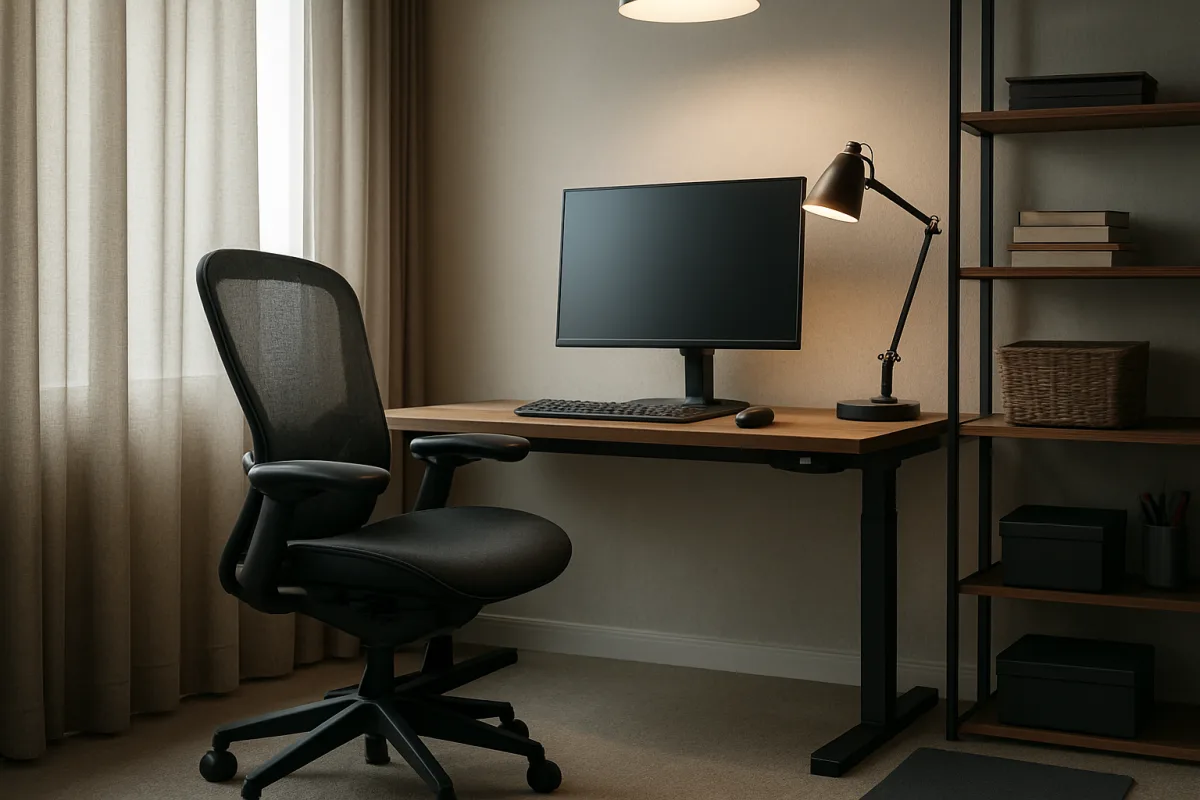
How to Create a Focus-Friendly Workspace
Set the desk and chair before buying accessories
You need a desk arrangement that lets you work without continually correcting your position. A lamp, a tray, or a better-looking shelf will not solve a chair that leaves your shoulders raised or a desk that keeps your wrists bent.
For standard desk setups, aim for a desk height of 29 to 30 inches, a depth of 24 to 30 inches, and a width of 48 to 72 inches. Those ranges give you room for a screen, keyboard, and working materials without forcing everything into one crowded strip. [2]
Desk depth is easy to overlook in a small room. A shallow desktop can leave your monitor too close, push papers under your keyboard, and make a task light compete for the same few inches of surface.
Choose a chair with a seat height adjustment range of 16 to 21 inches. Look for a seat at least 19.2 inches wide, plus a seat depth that leaves 2 to 4 inches between the front edge and the back of your knees. [2]
Armrests should adjust within a 7 to 11.5-inch height range. The aim is neutral posture, with your forearms supported without your shoulders creeping upward toward your ears. [2]
These are general dimensions, not a fit guarantee for every body or disability. Make the adjustment that removes strain from your own setup, and seek clinical guidance for persistent pain, numbness, sleep issues, or other health concerns.
We would spend the first hour on this step, even if the desk remains bare afterward. A workspace becomes focus-friendly when it stops demanding your attention for physical reasons.
Put the desk near daylight without putting the window in your screen
Place the desk near a window if you can, especially during winter, when natural light may be harder to get during the working day. Do not block the window with tall storage or a bulky monitor arrangement. [6]
The workable position is one that brings daylight into the room while keeping glare off the display. If the window creates reflections, shift the desk angle or use window coverage that softens direct light without turning the room dim.
Furniture placement can undo a promising room quickly. Overcrowding, blocked natural light, and a layout that leaves no clear working zone are common workspace mistakes. [7]
Keep a clear route to your chair and give yourself enough space to stand up without moving boxes or cables. That sounds minor until each break becomes a small rearrangement project.
Build lighting in layers
For routine office work, target general lighting of about 500 to 750 lumens per square meter. Detailed desk tasks call for 750 to 1,500 lumens per square meter, while precision work may need 1,500 to 3,000 or more. [2]
If those measurements are not available to you, start with roughly 500 lux across the work surface through a combination of room lighting and a desk lamp. One bright overhead fixture alone often creates shadows or glare. [6]
Use three layers. Ambient lighting gives the room an even base, task lighting puts light on reading or writing, and accent lighting can reduce the harsh contrast between a bright screen and a dark corner. [6]
Choose warmer white light, around 2,700K to 3,000K, for winding down or a calmer room. Cooler white or daylight tones of 5,000K to 6,500K are used for alertness and daytime tasks. [2]
A tunable LED light gives you a way to change color temperature through the day rather than committing the whole room to one setting. We would choose tunable lighting if you work in the same room from morning into evening.
Position a task lamp so its beam falls on paper or a keyboard without reflecting into your eyes or across the monitor. The goal is a usable work surface, not maximum brightness.
Reduce the sounds that keep pulling you out of a task
A quiet workspace does not have to be silent. Focus is best supported around 30 to 40 dB, levels up to 50 dB can remain acceptable, and noise above 65 dB becomes disruptive. [3]
Start by identifying what you actually hear during work: voices through a door, traffic at a window, appliances cycling, or a roommate taking calls. The solution depends on the route the sound uses.
For sound leaking through a door, basic door seals cost around $25. That figure covers the seal itself, not installation, tools, or any other soundproofing materials. [5]
Acoustic curtains or heavy moving blankets can reduce sound by about 5 to 8 dB. They are a low-commitment option for renters, though they will not create the isolation of a rebuilt wall. [5]
For a more involved setup, mass loaded vinyl adds density to a barrier, while mineral wool insulation has a noise reduction coefficient of 0.85 to 1.05. These materials require a suitable installation location and may mean a larger project than a home-office refresh. [5]
If you cannot change the room, use sound masking. White noise, brown noise, and nature sounds are cited as helpful background options for focus, provided they remain steady and quiet enough not to become their own distraction. [4]
Bose QuietComfort Ultra headphones are one current noise-masking option. We would reserve headphones for recurring, uncontrollable noise, not wear them by default in a room that could be improved with a door seal or better layout. [3]
Give clutter a destination beyond the desktop
Before organizing, remove anything from the desk that does not serve the work you are doing today. Keep the current tools within reach, then assign the rest to closed storage, a shelf, or a cart.
A 2023 systematic scoping review linked physical home-workspace clutter with increased stress and poorer mental-health outcomes. It did not establish a precise percentage loss in concentration, so do not expect a neat desk to produce a guaranteed productivity score. [1]
The Costway 6-Shelf Wooden Desktop Bookshelf, at about $60, suits someone who needs vertical storage directly above the desk. The approximate price is for the shelf unit, not delivery, assembly, or other desk accessories. [1]
IKEA TRONES Wall Cabinets come as a set of three and suit small rooms where floor space is scarce. Mounting hardware, installation, and wall suitability can add work or cost beyond the cabinet set itself. [1]
The IKEA RÅSKOG Utility Cart costs under $50 and works for supplies that move between a desk, printer, and another room. Its listed price covers the cart, not assembly or the containers you may add to keep small items sorted. [1]
For a powered desktop option, the Aetheris 5-Tier Desktop Organizer costs under $70 and includes outlets and a light. The HOOBRO 2-Tier Desktop Shelf also includes outlets and a light for under $60, with both prices covering the organizer unit rather than installation or extra charging cables. [1]
We would pick the least elaborate storage that removes your daily pile. A cart works if your work changes locations, while a shelf or wall cabinet works better if papers and supplies keep spreading across one permanent desk.
Check the air and seasonal comfort in the room
Set relative humidity between 40 and 60 percent, and keep carbon dioxide below 1,000 ppm to avoid conditions associated with cognitive impairment. [1]
A Levoit Core 300S or GoveeLife Smart Air Purifier Lite are affordable purifier options for typical workspace sizes. They can help with air cleaning, but they do not replace ventilation or solve a room that becomes hot, cold, or stuffy at predictable times. [1]
For dry air, options include the Dreo HM524S, Levoit Classic 300S, and Honeywell HCM-350 humidifiers. The Levoit Classic 300S is a smart ultrasonic cool-mist humidifier. [9]
Seasonal changes deserve a check before they become a daily annoyance. Attic ducts can gain heat or lose it with outdoor swings, and neglected HVAC adjustments can leave a workspace uncomfortable and inefficient. [6]
Do not crowd a heater, vent, or window with storage. If the room remains uncomfortable despite ordinary adjustments, treat that as a building or health question, not a sign that you need to push through.
Add breaks to the setup, not just your intentions
Your workspace should make it easy to step away briefly. Keep enough open floor space to stand, stretch, and return without navigating cables, boxes, or an overstuffed chair area.
For lighter-focus tasks, take short breaks every 25 to 52 minutes. For deep work, use longer breaks around every 90 minutes. [8]
Add microbreaks every 20 to 30 minutes, lasting 20 to 30 seconds, with standing or stretching. These are small interruptions by design, not a reason to open another app or start answering messages. [8]
One 2026 study also found that turning off task lighting for 30 seconds every 9.5 minutes could boost sustained concentration during intellectual work under task-ambient lighting. [11]
We would start with the longer work-and-break rhythm and use microbreaks when you notice yourself tightening up at the desk. The light-off pattern is specific enough to try if task lighting is already part of your setup, but it should not become another timer you spend the day managing.
Frequently Asked Questions
How do I set up a focus-friendly workspace?
Start by adjusting your chair and desk to support a neutral posture that avoids physical strain. Use a desk height of 29 to 30 inches and a chair with adjustable seat height between 16 and 21 inches, ensuring your forearms are supported without raising your shoulders. Keep your workspace organized by giving every item a designated place off the desk to reduce clutter and stress. Also, build breaks into your routine by standing or stretching every 20 to 30 minutes.
What lighting is best for a focus-friendly workspace?
Aim for about 500 lux of layered lighting for routine desk work, combining ambient room lighting with a task lamp focused on your work surface. Use cooler white or daylight tones (5,000K to 6,500K) during daytime for alertness, and warmer white light (2,700K to 3,000K) when winding down. Position task lights to illuminate papers or keyboard without causing glare on your screen. Tunable LED lights can help adjust color temperature throughout the day.
How can I reduce noise distractions in my workspace?
Maintain background noise levels near 30 to 40 decibels to support focus. Address noise by sealing doors, using acoustic curtains or heavy blankets to dampen sound, and consider noise-canceling headphones if the environment remains loud. These solutions reduce disruptive sounds and help maintain a steady, low-level background noise conducive to concentration.
What ergonomic desk and chair setup improves focus?
Choose a desk 29 to 30 inches high, 24 to 30 inches deep, and 48 to 72 inches wide to accommodate your screen, keyboard, and materials without crowding. Select a chair with a seat height adjustable from 16 to 21 inches, at least 19.2 inches wide, and a seat depth that leaves 2 to 4 inches between the front edge and the back of your knees. Armrests should adjust between 7 and 11.5 inches high to support your forearms without raising your shoulders.
How should I arrange my desk near a window for better focus?
Place your desk near a window to benefit from natural daylight, especially in winter, but avoid positioning your screen directly in front of or blocking the window to prevent glare and reflections. If glare occurs, adjust the desk angle or use window coverings that soften direct light without darkening the room. Keep the area around your desk clear to allow easy movement and maintain an uncluttered workspace.
How we researched this
This article was assembled from 11 cited references.
Nothing here is based on hands-on testing. Where a figure or finding appears, it belongs to the source cited beside it, and the writing says so rather than implying otherwise. Every source is listed below so you can check it.
Sources
- How physical home workspace characteristics affect mental health: A systematic scoping review.
- How to Calculate Your Optimal Workspace Lighting for Peak Productivity: Measuring Lumens, Color Temperature, and Eye Strain Impact | Unreliant
- How to Reduce Office Noise: 7 Practical Solutions for Focus | Standesk
- Best Background Sounds for Focus | mysimulator.uk
- Best Renter-Friendly Soundproofing Products That Actually Work
- How Seasonal Changes Impact Workplace Cleanliness and What to Do About It
- 10 Office Layout Mistakes and How to Avoid Them - Workspace Iowa
- When to Take Breaks at Work: Signs and Schedules - ScienceInsights
- Jual Levoit Air Humidifier Classic 300S Smart Ultrasonic Cool Mist Humidifier Pelembab Udara | Shopee Indonesia
- Are these 6 home office design mistakes ruining your productivity?
- Effect of light-off microbreaks on sustained concentration during intellectual work under task-ambient lighting settings - R Abe, M Yamazaki, K Ueda, H Ishii, H Shimoda, F Obayashi, 2026
Related Articles
Best Environment for Productivity: Key Workspace Conditions
Discover the best environment for productivity with tips on lighting, noise, ergonomics, and temperature to optimize your workspace.
Productive Workspace Setup
Learn how to set up a productive workspace with ergonomic desk and chair fit, proper lighting, and sound control for better focus and efficiency.

Improve Focus During Meetings with Proven Strategies
Learn how to improve focus during meetings with clear agendas, active roles, effective note-taking, and managing distractions for better productivity.

Minimize Distractions at Work: Practical Strategies to Focus
Learn how to minimize distractions at work with practical tips on managing notifications, focus blocks, and communication for better productivity.