
Eisenhower Matrix: What It Is and How to Use It
Learn what the Eisenhower Matrix is and how to prioritize tasks effectively using its four quadrants for better productivity.
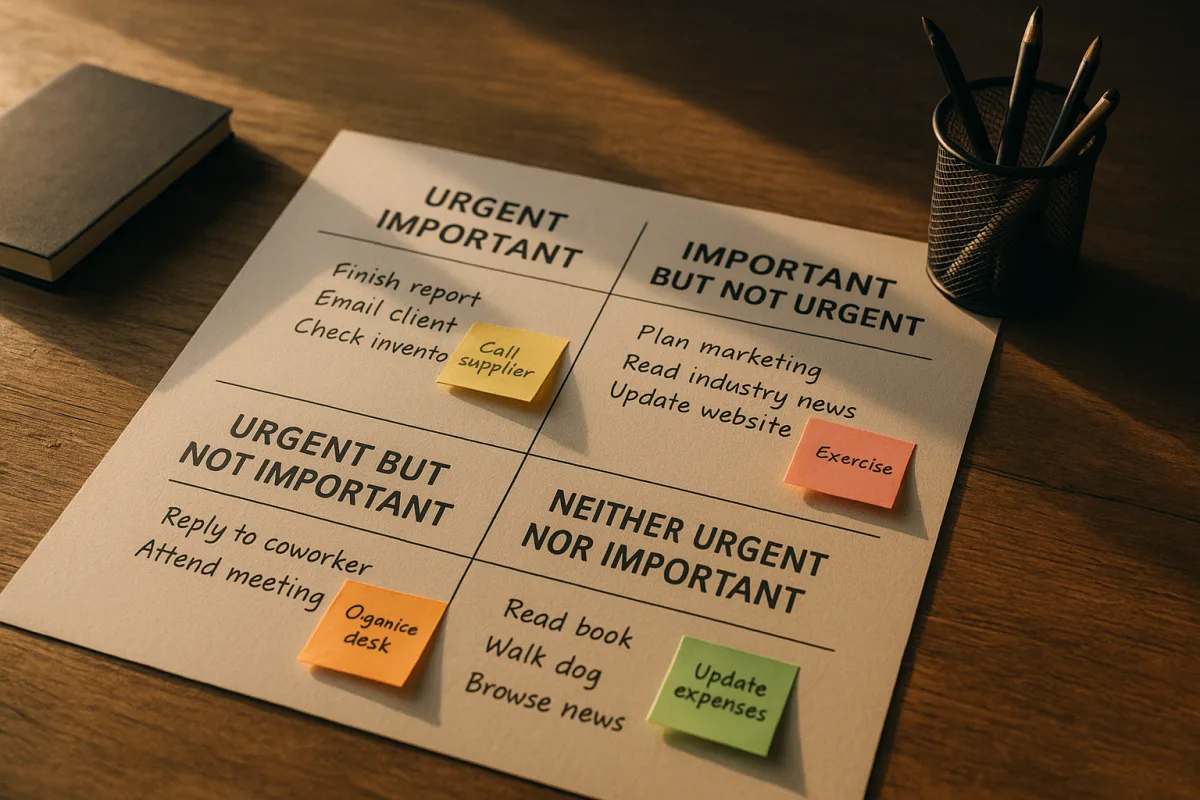
Start with the list that is crowding your day
You have a calendar, messages waiting for replies, deadlines, recurring chores, and a task list that has become a record of everything you could conceivably do. The Eisenhower Matrix gives each item one of four destinations.
It is a prioritization tool, not a scheduling system. You sort work according to urgency and importance, then decide whether to do it now, plan it, delegate it, or remove it. [1]
The matrix does not calculate the correct answer for you. Its value comes from forcing a choice about why a task deserves your time before you begin it.
The two questions behind the grid
Urgency means there is real time pressure. A deadline is near, a problem needs a response, or waiting has an immediate cost. [2][3]
Importance means the task contributes meaningfully to a goal or responsibility. That might mean serving a client, meeting a work commitment, maintaining something you are responsible for, or making progress on a longer-term objective. [2][3]
Those definitions sound obvious until you apply them to an inbox. A request can be urgent to its sender without being important to your work, and a valuable project can be important while having no deadline at all.
For each task, ask: Is there actual time pressure? Does this affect our goals or responsibilities? [2][3] Put the task where your answers lead, without trying to make every item feel equally worthy.
A meeting invitation may have a reply deadline today, for example, but that only establishes urgency. Whether attending is important depends on whether your presence or decision is needed.
The four places a task can go
The first quadrant is urgent and important, commonly labeled Do First. It covers crises, pressing deadlines, and work that needs immediate attention. [1]
A time-sensitive client problem, a report due this afternoon, or a responsibility you cannot defer belongs here. Do the work yourself if it genuinely requires your judgment or accountability.
This box should be short. ClickUp recommends keeping it to three to five tasks a day, because loading it with everything creates a list of competing emergencies instead of a workable order. [6]
The second quadrant is important but not urgent, usually labeled Schedule. This is where planning, preparation, personal development, and work toward long-term goals belong. [1]
A project outline for next month, preparing for a predictable busy period, or building a skill required for your role may not demand attention today. They still need a place on the calendar before urgent work crowds them out.
This quadrant is the point of the matrix for many people. It asks you to reserve time for work that reduces future problems or advances a goal, instead of waiting until that work becomes a crisis.
The third quadrant is urgent but not important, often labeled Delegate. It includes some interruptions, requests, and meetings that require a response but are not critical to your own goals. [1]
Delegation does not mean handing off anything you dislike. It means deciding that another person can handle the task appropriately, then making the request clearly enough that you are not left doing the job again later.
That option depends on your role. If you manage nobody, cannot shift work to a colleague, or are personally accountable for every response, “delegate” may mean minimizing, automating, declining, or setting a boundary instead.
The fourth quadrant is neither urgent nor important, often labeled Eliminate. Examples include trivial tasks and excessive social browsing. [1]
Eliminate can be a blunt label. Some low-stakes activities are enjoyable, restorative, or part of a relationship, even if they do not advance a formal goal. The matrix is for deciding what belongs on a work list, not for declaring that every unproductive minute is a failure.
For a task that truly belongs here, the decision is to stop, reduce it, or avoid adding it to your list in the first place. Otherwise, it takes attention from work that has a clearer claim on your day.
What the matrix asks of you daily
The method works best as a repeated sorting habit. New tasks arrive, deadlines move, and an item that belonged in Schedule on Monday can become Do First by Thursday. [6]
A daily or weekly review is commonly recommended, but no published guidance establishes an exact review frequency or a proven schedule that works for everyone. Pick a rhythm tied to how quickly your work changes.
Keep the sort brief. Write down current tasks, apply the two questions, then take action from the quadrant rather than spending half an hour debating subtle differences between items.
The action matters more than the diagram. A second-quadrant task needs protected time, a third-quadrant task needs a handoff or a response rule, and a fourth-quadrant task needs removal from your attention.
There are no established percentages for how much time each quadrant should receive. General guidance is to minimize urgent-and-important work, give significant time to important nonurgent work, delegate or reduce urgent low-importance work, and reduce the rest. [1]
That leaves room for your actual constraints. A week with a launch, illness, or an external deadline may be heavy on urgent work. The signal to watch is whether every week looks that way.
Where people get stuck
The common mistake is treating busy work as important work. A quick reply, a routine request, or a meeting can produce the satisfying feeling of completion while doing little for the outcomes you are responsible for. [7]
Another is allowing the first quadrant to become the whole system. If everything is marked urgent and important, the grid has stopped ranking anything and has become a more decorative task list.
Neglecting the second quadrant has a predictable cost: work tied to growth, planning, and prevention gets postponed until it turns urgent, or never gets done at all. [7]
Avoiding delegation can also leave you carrying every interruption yourself. Dectrack identifies this as a route to burnout, though the matrix cannot create authority, staffing, or trust where none exists. [8]
The method also assumes you can allocate blocks of attention after you sort. In highly interruptive or asynchronous work, unpredictable requests and constant disruptions can make that assumption fail. [13]
If you work in a support queue, on-call role, or job where new issues continuously override your plan, use the matrix to identify what you can defer or hand off. Do not expect it to protect uninterrupted time you do not control.
It is also a poor tool for high-uncertainty decisions involving many stakeholders. A four-box grid can oversimplify strategic or policy choices where consequences, obligations, and information are contested. [14]
How it compares with other methods
The Eisenhower Matrix decides the category of work. It does not tell you exactly what to do first within a quadrant, how long to work, or how to break a large project into smaller pieces.
The ABCDE method, associated with Brian Tracy, ranks tasks by letter according to consequences and delegation. It is closer to a straight ordered list for days when you need a sequence, not four categories. [9]
The Pomodoro Technique, developed by Francesco Cirillo in the late 1980s, organizes focus time into 25-minute work intervals followed by five-minute breaks. It addresses sustained attention, while the matrix addresses what deserves attention. [9]
You can combine them without turning your system into a hobby. Sort tasks with the matrix, choose a single scheduled task, then use a timed interval if that helps you begin and continue.
No direct comparative studies quantifying productivity gains from the Eisenhower Matrix against these methods have been identified. Choose based on the problem in front of you: sorting, ranking, or getting through a block of work.
Paper, a task app, or a dedicated matrix
A sheet of paper is enough to use the matrix. Draw four boxes, add only your current tasks, and decide the next action for each one. We would start there before paying for a dedicated app.
If you want a purpose-built option, the Eisenhower App offers a free plan. Its annual-billing premium tiers are $4.90 a month for General and $9.90 a month for President, with prioritization, scheduling, delegation, and cross-platform sync listed among its features. [10]
Focus Matrix offers unlimited tasks on its free version. Its Pro version adds recurring tasks, cloud sync, and insights, which may suit someone whose matrix needs to carry forward from week to week. [15]
TickTick includes an Eisenhower Matrix template and has a free tier plus Premium at $49.99 a year. It fits someone who already wants a broader task manager, not someone looking only for a four-box board. [11]
Notion can be configured to replicate the matrix, but it requires setup. It suits people already keeping projects and notes there, and it is easy to overbuild if all you need is a daily decision about your tasks. [12]
Dwight is a dedicated option listed as free on Android and $3.99 as a one-time iOS purchase. It may appeal if you want the matrix without a subscription, though the published listing does not establish feature parity across platforms. [16]
What we would keep
We would keep the matrix as a short decision step at the start of a day or week. It is especially good at exposing the difference between a deadline and a priority.
We would protect the Schedule quadrant first. Put one important, nonurgent task on the calendar with a defined next step, because a box on a diagram does not create time by itself.
We would skip elaborate scoring systems and resist treating every interruption as a crisis. If your work cannot accommodate a planned list, use the grid to clarify tradeoffs, then build your day around the demands you actually cannot move.
Frequently Asked Questions
What is the Eisenhower Matrix and how does it work?
The Eisenhower Matrix is a prioritization tool that sorts tasks based on two questions: whether a task needs immediate attention (urgency) and whether it meaningfully supports your responsibilities or long-term goals (importance). It helps decide if you should do a task now, schedule it for later, delegate it, or eliminate it.
How do I prioritize tasks using the Eisenhower Matrix?
To prioritize, ask for each task: Is there real time pressure? Does it affect our goals or responsibilities? Tasks that are both urgent and important should be done immediately, important but not urgent tasks scheduled, urgent but not important tasks delegated, and tasks that are neither urgent nor important eliminated or minimized.
What are the four quadrants of the Eisenhower Matrix?
The four quadrants are:
- Do First (Urgent and Important), tasks needing immediate attention like crises or pressing deadlines.
- Schedule (Important but Not Urgent), tasks related to planning, preparation, and long-term goals.
- Delegate (Urgent but Not Important), tasks that require prompt action but can be handled by others.
- Eliminate (Not Urgent and Not Important), trivial or time-wasting activities.
When should I delegate tasks in the Eisenhower Matrix?
Delegate tasks that are urgent but not important to your own goals, such as some interruptions or meetings that require a response but not your judgment. Delegation means assigning the task clearly so you are not left doing it again later. If delegation is not possible, consider minimizing, automating, declining, or setting boundaries.
How can the Eisenhower Matrix improve my productivity?
By forcing you to classify tasks based on urgency and importance, the matrix helps focus your time on what truly matters, prevents overload of urgent tasks, and protects time for important work without deadlines. It encourages scheduling long-term projects and delegating or eliminating less critical tasks, which can reduce stress and improve efficiency.
How we researched this
This article was assembled from 16 cited references.
Nothing here is based on hands-on testing. Where a figure or finding appears, it belongs to the source cited beside it, and the writing says so rather than implying otherwise. Every source is listed below so you can check it.
Sources
- The Eisenhower Matrix: A Complete Guide, Eisenhower Notes
- What Is the Eisenhower Matrix? Urgent vs Important, With Examples
- Urgent vs Important: The Key Difference Explained | Eisenhower Matrix
- Eisenhower Matrix | Stratrix Frameworks
- Eisenhower Matrix Guide and App | Priority Matrix
- Eisenhower Matrix: Prioritize Tasks in Four Quadrants
- The Complete Eisenhower Matrix Guide | Prioritize What Matters | CoreWeek
- Eisenhower Matrix: How to Prioritize Tasks Effectively
- Task Prioritization Methods - Frameworks and Techniques | Pomodoronline
- Official Eisenhower Matrix Apps
- Best Eisenhower Matrix Apps in 2026 · WeekOf7
- Best Eisenhower Matrix Apps 2026: Top Tools [Tested]
- Productivity Research Shows the Eisenhower Matrix Is Inadequate for Async Work
- Eisenhower Matrix: Urgent vs Important Tasks Explained | Editors Outlook
- Focus Matrix, Task Manager - Productivity App | MWM
- Dwight - ToDo Priority Matrix 2.3.1 Free Download
Related Articles

How to Prioritize Tasks Effectively for Better Productivity
Learn how to prioritize tasks effectively using proven methods like the Eisenhower Matrix and impact scoring to boost your productivity.

80 20 Rule for Productivity
Learn how to use the 80 20 rule for productivity to identify and focus on tasks that drive the most results each week.

Create an Effective To-Do List: Tips for Better Productivity
Learn how to create an effective to-do list with actionable tasks, prioritization, and daily planning to boost your productivity.

Common Productivity Mistakes and How to Avoid Them
Learn about common productivity mistakes like task switching and tool overload, and how to avoid them for better focus and work output.